Octopus Tenant Manager Admin Guide
For extended configuration details, role explanations, and MSP onboarding workflow, download the latest version of the Admin Guide.
⬇ Download Admin Guide (PDF)Overview
The Octopus Authentication Server provides a cloud-based centralized authentication platform for the workforce. This document describes the new features and enhancements available in Octopus Authentication Server version 6.8.3.
New Features
MSP Primary Tenant [SSA-18199]
Each Managed Service Provider now has a dedicated tenant designated as the Primary Tenant. The Primary Tenant has full authority to manage itself and all other tenants under the MSP. Every administrator authorized to manage tenants is a user within the Primary Tenant organization.
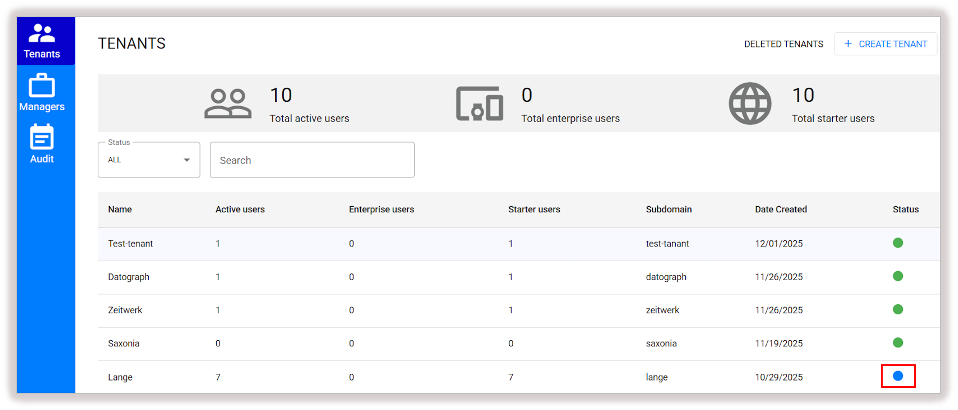
The Primary Tenant is highlighted with a blue status icon in the tenant list.
Primary Tenant User Integration [SSA-18200]
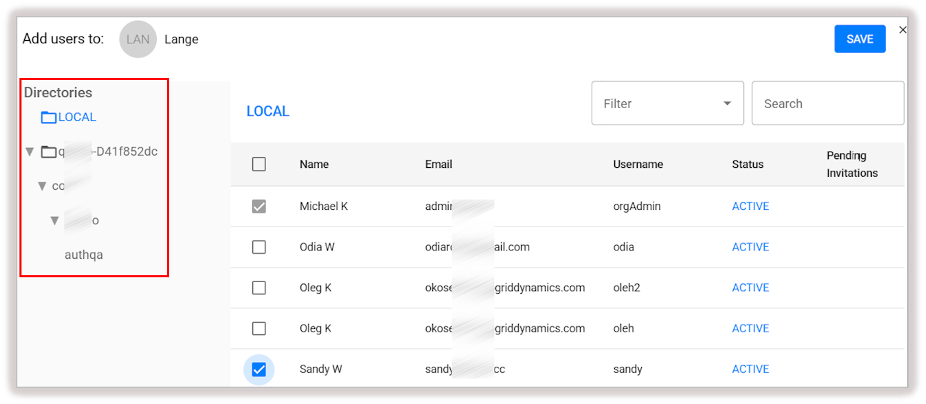
All managers in the Tenant Manager tool must now be users within the Primary Tenant's organization. They may originate from any directory integrated with the tenant's Management Console.
Eligible users and groups are automatically retrieved from the Management Console for easier assignment.
User Role & Scope Enhancements [SSA-18201]
The terminology for roles and permissions in the Tenant Manager has been clarified and updated:
MSP Role
- MSP User: Access to Management Consoles of assigned tenants. Minimal Tenant Manager permissions.
- MSP Admin: Full administrative access in the Tenant Manager.
Tenant Role
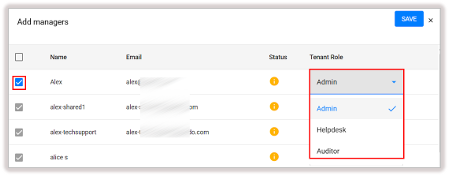
Roles reflect the permissions inside each tenant's Management Console:
- Admin
- Helpdesk
- Auditor
Tenant roles are assigned during manager onboarding and may be updated anytime from the tenant's Managers tab.
For additional details, please refer to the Octopus Tenant Manager Admin Guide.